
🎧
Customer Support
Reply to customer messages using the answers and guides the employer provides.
- Clear written English
- Phone, tablet or laptop
- WhatsApp on your phone
Work you can do on your phone. Online training is provided, and HR explains the details on WhatsApp before you begin.
⚠Heads up: your application is only complete after you send HR a WhatsApp message. The form alone is not enough.


 Applicants from all over Australia
Why apply
The basics are the same for each role: home-based work, online training and a person to talk to.
Everything is done where you live, with no office to travel to.
A phone, tablet or laptop can be used for the work.
Lessons walk through each part of the role before you begin.
Questions go straight to the HR team, who reply in the same chat.

The people behind it
Each position comes with online training, and the work is done from home on a phone. HR goes through the details, the schedule and what is expected with you on WhatsApp before anything starts. Send the form, then message HR on WhatsApp to continue your application.
Why RemoteQuokka
A plain picture of how things run, from the first message to your first day.
HR explains the role, the schedule and what is expected before anything is agreed.
The online lessons stay available, so you can go back over any step.
Your messages are answered by a member of the HR team, not an automated bot.
The work happens at home, wherever you live in Australia.
The phone, tablet or laptop you already own is enough to take part.
What you send is used for your application only and is never sold.
Pick the closest one in the form, then message HR on WhatsApp and ask about the others.
Work available
Each role is done from home with online training. HR explains the details of every one on WhatsApp before you begin.
Reply to customer messages using the answers and guides the employer provides.

Copy details into online forms and lists, following the layout shown in training.
Help small teams keep calendars, messages and records in order.
Keep online records tidy and up to date, using templates from the employer.
How you start
Five steps, all handled on your phone.
Fill in the application form with your name and contact details.
Message HR on WhatsApp. This step completes your application.
HR explains the roles, the schedule and what is expected.
Online lessons you can watch on your phone.
HR confirms your role and first day with you on WhatsApp.
Getting started
These are the only things HR asks for before the training.
Reviews
The form was clear to fill in, and HR walked me through everything on WhatsApp. Very friendly.
BrookeCustomer Support · Port AugustaThe training was clear and well explained on my phone. Would recommend.
LiamData Entry · Port PirieI do it on my phone, and HR has been friendly and helpful whenever I had a question.
GeorgiaVirtual Assistant · QuornYour questions
Anyone living in Australia with a phone and WhatsApp.
Choose the one that sounds closest to you in the form. HR explains every role on WhatsApp, and you can change your choice before anything is agreed.
The training is online and shows each step. HR is on WhatsApp if you have any questions.
HR goes through the schedule and all the details with you on WhatsApp before you begin.
Not yet. Message HR on WhatsApp — forms without a WhatsApp message are not processed.
Apply
Two steps: send the form, then send HR a WhatsApp message. Both are needed.
Enter your name and number in the form.
WhatsApp opens after you submit, with a note already written. Press send to complete your application.
⚠ Until HR gets your WhatsApp message, your application is not complete.
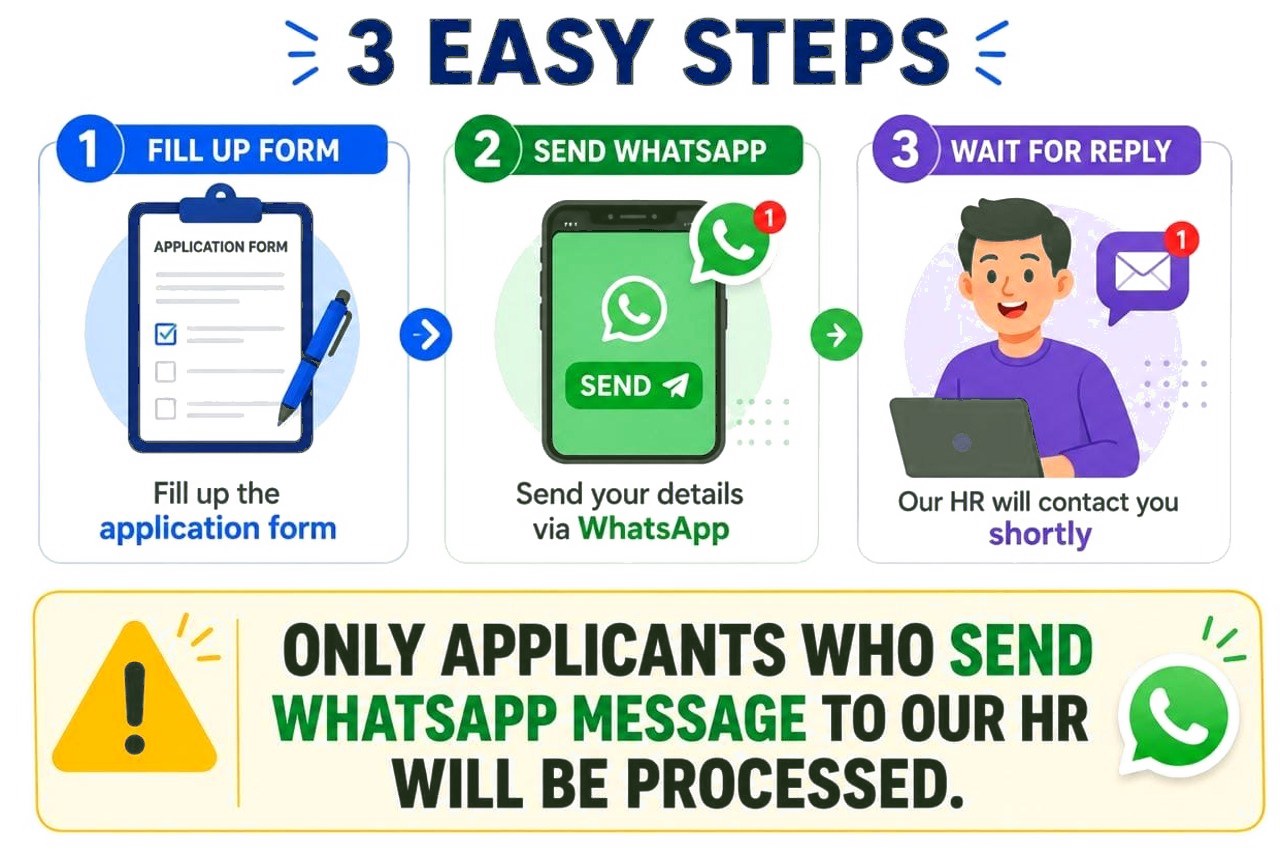
HR replies to applicants from WhatsApp. Send a message once the form is done to complete your application.
Send the form, then message HR on WhatsApp to complete your application. Your application is only complete after you send that message.
Apply nowDrop us a line
To ask about a position, Message HR on WhatsApp. You can also email us below.